Putting It All Together

In the past couple of months, we’ve talked about some of the equipment options that we offer at Record My Research. Today, it is time to lay them all out and discuss how they all work together.

The Pieces

The hardware that we have discussed are:

There are a couple of more traditional pieces that we have not discussed, namely the 4K Sony cameras and the audio gear. These are still interesting, but a bit less unusual than the ones listed above. However, how much of this traditional equipment is being used helps us decide which of these more unconventional pieces to bring along.

How Many of What

The real issue is the number of cameras we need. If we only need one, regardless of whether it is a traditional camera or the 360 Panoramic one, it can be plugged into the LiveU Solo Streaming Encoder. That one piece will convert the audio and video feeds into a streamable feed and then feed it to either a local Internet connection or through a cellular modem, depending on which is more reliable. This is the typical single-camera focus group streaming setup.

If we need more than one camera and multiple audio feeds, each of which may need to be viewed by different people at the same time, then the LiveU no longer cuts it. That’s when we need to Mushroom Portabella 4000i and Epiphan Pearl 2.

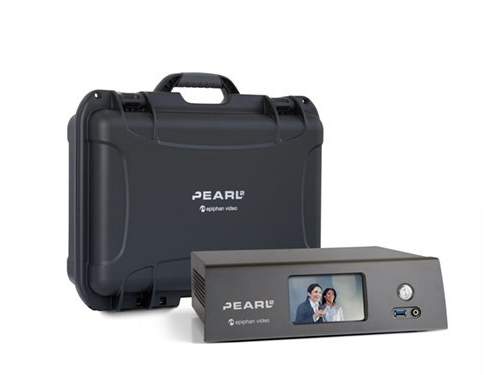
The Pearl 2 can take up to six cameras with their associated audio feeds and encode them for streaming. If we have a reliable local Internet connection with at least 50 Mbps, then it can feed them out to whomever has the link and password.

But we never assume that the local Internet is going to be robust enough. That is why we carry along the Portabella 4000i. If our test show that the venue network is going to be problematic, then we have it as a backup.

Streaming Service

Keep in mind that all of this equipment is part of our streaming service and not part of our basic package. With all of this gear, we do need to charge a bit more to make that happen. However, remember that it can save you and your clients money and offer you greater flexibility: fewer people need to travel to the sessions, and more people can see the event first hand.

For more information on this or any of our services, please reach out to us via email (events@recordmyresearch.com) or call us at 1-800-910-9553.
Highway Streaming

Image courtesy Epiphan Systems, Inc.

Over the past few weeks, we’ve been discussing some of the hardware we use to stream content on the road. This week, is the last big piece in our toolkit, the Epiphan Pearl 2 Streaming Encoder.

Six Lanes of Video

The Pearl 2 is what we use when we need to stream more than one camera to a remote location. It can encode and stream up to six devices from a variety of sources (HDMI, USB or a network camera). This means that if there are several discussions/deliberations/sessions going on at once, we can have a camera in each and send them out. Or we can have multiple camera angles of a single room, capturing different participants or other events that might be happening in that space.

What makes the Pearl 2 truly special is that we do not need to decide which of its streams to send out. It sends them all. Each of the six feeds are simply channels that can be switched between at your clients’ needs and watched simultaneously. On site, we will often dedicate a monitor to each camera feed, allowing everyone in the client viewing room to see what is going on everywhere. With the Pearl 2, we take that experience wherever your clients might be.

Secure Service

One of the dangers of streaming is that someone other than your clients might find a way to watch the feed. The Pearl 2 is more than a video encoder, it is also a secure server for the feed. We provide you with a link and password for the device that is good for that session. You provide those to whomever needs it on your end and everybody is good to go.

Well, almost. What this device does not include is the actual network. Unlike the Live U, it needs a network to connect to as it does not have any built-in cellular modems. To mix up the highway metaphor a bit, it is a large semi hauling up to six trailers, but it still needs access to the roads. That is where the Mushroom Portabella comes in. But we’ll discuss how all of these devices work together next week.

Flexibility

Keep in mind, all of these devices allows Record My Research to give you flexibility when discussing options with your clients. Break out rooms and different camera angles are all part of our experience, whether locally viewed or streamed. Of course, if all they want is a single camera to a local viewing room, then we are perfectly happy to do that. But we can do more. Whatever you and your clients need.

Internet Four Wheel Drive

Portabella 4000i

We’re going to continue looking at some of the solutions that Record My Research offers to our clients looking to do remote research. This week, the Mushroom Networks Portabella 4000i is on the stand.

More Than Four Wheel Drive

The Portabella is a cellular modem, but saying that is a bit like calling a Acura NSX 4-Motor EV just another car. Sure, it connects to the closest cellular tower, be it 3G or 4G, and delivers internet access, but like the Acura, it uses four independent cellular connections, combines them, manages them intelligently and outputs the fastest and most consistent cellular access available in the area. Like the 4 independent motors in the Acura, to tie down the simile.

Streaming More Than One Camera

Like all of the tech that we’ve discussed, the Portabella is the answer to a problem that we’ve encountered on the road. In this case, it is the unreliable nature of venue internet connections.

No matter what kind of event we are recording, from conferences, mock trials, focus groups or even (comparatively) simple dispositions, some form of network connectivity is required. At the very least, we are sending updates to our home office in Albuquerque and to our clients as to what is going on. Usually, this is also coupled with a video stream of the proceedings.

For a single camera setup, the Live U we discussed in an earlier post, is enough. That has a video encoder and cellular modem in a single package. But it will not work for two or more feeds. That’s where the Portabella comes in, along with a multi-camera video encoder.

Keep in mind, that we store and stream the individual feeds from each camera involved in the event. If we have one focused on the jury box, another on the prosecuting table and a final one on the defendant table, then we send all three out at once. More importantly, multiple live streams for the deliberation rooms. We do not attempt to do a live edit of the feeds; inevitably something gets lost or cut too soon. Streaming everything lets our clients decide what they want to look at when they want to look at it, instantly. In real time and independent from what others are watching on the streams.

Part Of The Kit

We bring the Portabella along on any trip that involves multiple cameras. It sits in our protective cases next to a multi-camera streaming video encoder. If our client isn’t interested in a steaming feed or the location internet connection is good, then we don’t fire it up. But it is a back up that we’ve learned we need.